

Organizations worldwide have built their productivity infrastructure on Microsoft 365 yet operate with a blind spot in their data protection strategy. This critical misconception—that their data is fully backed up—creates measurable business risk that can turn into downtime, compliance failures, and permanent data loss.
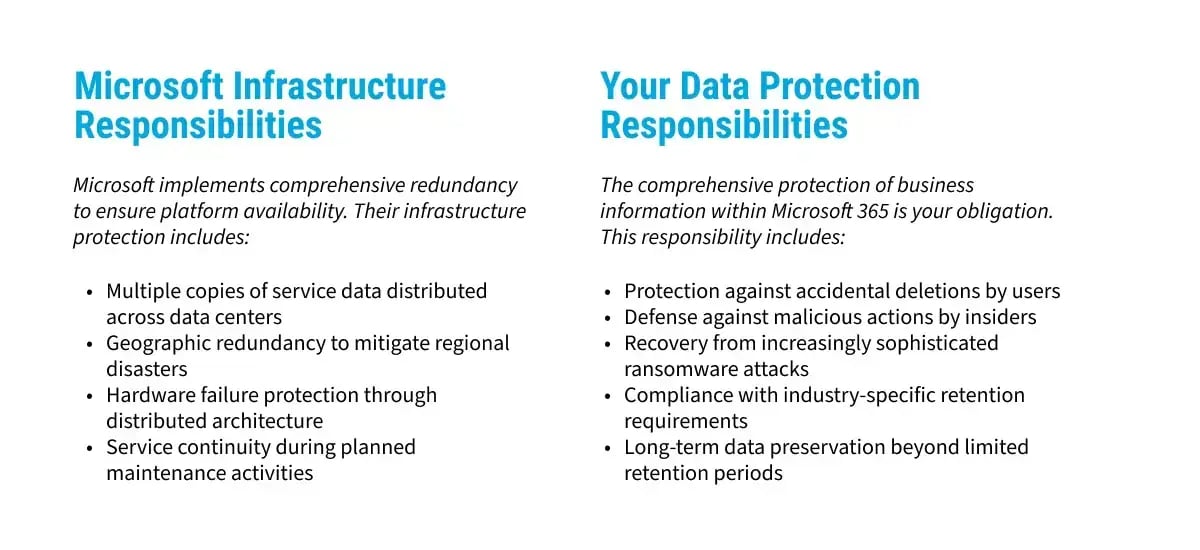
The protection gap stems from a misunderstanding of actual responsibilities between the vendor (Microsoft) and the client. While Microsoft maintains robust infrastructure redundancy to ensure service availability, its focus remains on platform uptime—not comprehensive data protection. Microsoft infrastructure design prevents service outages through redundant systems and geographically distributed data centers, but this architecture addresses fundamentally different risks than those targeting your actual business data.
This distinction isn't semantic—it creates specific, quantifiable vulnerabilities when organizations face:
- Accidental deletions that exceed Microsoft limited retention windows
- Targeted ransomware attacks designed to compromise cloud-based data
- Malicious insider actions that deliberately destroy critical information
- Compliance requirements that exceed Microsoft standard retention periods
The financial implications extend beyond the immediate data loss, including regulatory penalties, extended operational disruption, and productivity losses that compound with each hour of recovery delay. For regulated industries, these costs multiply when retention requirements conflict with Microsoft standard capabilities.
Understanding the shared responsibility model isn't merely a technical consideration—it's the foundation of effective cyber resilience in Microsoft 365 environments. Organizations that recognize this distinction implement protection strategies that address the full spectrum of threats to their critical business information.
What Exactly Does Microsoft Back Up, and What Falls Under Your Responsibility?
The actual Microsoft protection responsibilities differ fundamentally from what most organizations assume. Their service agreements establish clear boundaries between infrastructure availability and data protection—a distinction that becomes painfully apparent during critical recovery scenarios.
Critical Limitations of Native Protection:
Built-in Microsoft features provide basic safety nets rather than comprehensive backup capabilities:
| Microsoft Service | Native Retention | Key Limitations |
| Exchange Online | 14 days default in Recoverable Items |
No point-in-time recovery options No recovery after 14 days No self-service recovery No integrated role-based access |
| SharePoint/OneDrive | Limited time in Recycle Bin* |
Limited granular recovery capabilities No data available on day 94 and after No self-service recovery No integrated role-based access |
| Microsoft Teams | Limited time in Recycle Bin* |
No centralized recovery management No data available on day 94 and after No self-service recovery No integrated role-based access |
* Data is purged from the Recycle Bin after a 93-day period
These retention periods create significant compliance gaps for organizations in regulated industries. Healthcare providers subject to HIPAA, financial institutions under SEC requirements, and legal firms with client record obligations all face retention mandates measured in years—not days or months.
The shared responsibility model establishes clear boundaries requiring organizations to implement backup strategies to achieve complete data protection. Without purpose-built backup solutions designed specifically for Microsoft 365 environments, your organization operates with measurable vulnerability to data loss scenarios. Unfortunately, data loss due to poor SaaS platform backup policies occurs with alarming frequency across all industries.
What Everyday Data Loss Scenarios Threaten Your Microsoft 365 Environment?
Organizations are facing Microsoft 365 data loss incidents more frequently, and even common scenarios can have serious business consequences. From temporary data unavailability to disruptions in operations, these incidents can escalate quickly. At their worst, they can jeopardize compliance, damage customer trust, and negatively affect your bottom line.
Accidental Deletions — The Most Prevalent Microsoft 365 Data Threat
Most data loss in Microsoft 365 comes from simple user mistakes. These errors often happen in everyday scenarios:
- Permanent deletion of emails after Deleted Items folders are emptied
- Removal of critical SharePoint document libraries during site reorganization
- Overwriting of essential files in OneDrive with version history limitations
- Deletion of Microsoft Teams channels containing months of collaborative content
The business impact compounds rapidly. When deleted data exceeds Microsoft retention windows, recovery becomes impossible without third-party backup and recovery solutions.
Organizations face significant productivity losses quantified in labor hours required to recreate work, compliance documentation gaps that create audit exposure, and operational disruptions that affect multiple business functions simultaneously.
Malicious Insider Actions — The Underestimated Risk
Insider threats manifest through deliberate data destruction scenarios:
- Departing employees deleting critical files before resignation
- Compromised credentials used to systematically destroy business information
- Contractors with excessive permissions removing project documentation
- Former employees whose access wasn't properly revoked upon departure
These malicious actions frequently remain undetected until the damage extends beyond the Microsoft 365 native recovery capabilities. Without comprehensive backup protection that includes point-in-time recovery options, organizations cannot restore data to states before the malicious activity occurred—creating permanent business information loss.
Ransomware Attacks — The Evolving Sophisticated Threat
Modern ransomware variants specifically target cloud environments, including Microsoft 365.1 These attacks employ sophisticated techniques:
- Encrypting files across OneDrive and SharePoint document libraries
- Compromising email archives in Exchange Online through account takeover
- Destroying collaborative data in Microsoft Teams environments
- Demanding increasingly expensive ransoms for decryption capabilities
Organizations relying exclusively on built-in protection mechanisms in Microsoft 365 find themselves without clean recovery points when ransomware compromises their environment. The resulting business decision becomes binary: pay escalating ransoms with uncertain recovery outcomes or accept permanent loss of business-critical information.
Additional Threats Compromising Business Continuity:
- Synchronization errors that propagate deletions across connected devices
- Retention policy misconfigurations that permanently remove regulated data
- Third-party application integration errors that corrupt Microsoft 365 content
- Legal hold failures resulting from inadequate retention capabilities
Each scenario can be prevented when organizations implement comprehensive Microsoft 365 data backup strategies with appropriate retention policies.
The overall risk exposure from operating without proper Microsoft 365 backup translates directly into quantifiable business disruption, compliance failures, and financial losses.–Purpose-built backup and recovery solutions provide a safeguard against these scenarios with automated backup protection and granular recovery capabilities.
Datasheet: Why It's Crucial to Backup Microsoft 365 and Entra ID
What Are the 5 Essential Elements Every Microsoft 365 Backup Strategy Must Include?
Effective Microsoft 365 backup strategies require five interconnected elements that work together for comprehensive data protection and cyber resilience. Organizations implementing all five components position themselves to recover from data loss scenarios while maintaining regulatory compliance and minimizing operational disruption.
1. Comprehensive Coverage Across Microsoft 365 Services
Your backup strategy must protect every Microsoft 365 service that contains business-critical information:
- Exchange Online: Email messages, attachments, calendars, and contacts
- SharePoint Online: Document libraries, lists, pages, and site configurations
- OneDrive for Business: Personal and shared documents and files
- Microsoft Teams: Conversations, channels, tabs, and associated SharePoint content
- Additional Services: OneNote, Planner, and other Microsoft 365 applications
Partial coverage creates dangerous protection gaps that organizations typically discover only after critical data loss. Each service contains unique data structures requiring specific backup approaches that understand these differences.
2. Appropriate Microsoft 365 Retention Policies Aligned with Compliance Requirements
Retention policies must extend significantly beyond Microsoft standard windows to satisfy both operational needs and regulatory mandates:
- Define retention periods based on industry-specific compliance requirements
- Establish tiered retention policies for different data classification levels
- Ensure retention capabilities support legal hold and e-discovery requirements
- Implement extended retention for high-value business information
Many regulated industries face retention requirements measured in years—healthcare, financial institutions, legal firms, and others—and must maintain client communications for extended periods. Microsoft native retention capabilities (14-93 days) create significant compliance gaps that third-party backup solutions must address.
3. Secure Backup Storage with Enterprise-Grade Protection
Backup repositories require security controls that match or exceed your primary data environment:
- Immutable storage protects backups from alteration or deletion during defined retention periods
- Encryption protects data both in transit and at rest using industry-standard protocols
- Access controls implement least-privilege principles for backup management
- Geographic redundancy distributes backup data across multiple locations to mitigate regional disasters
Without these security measures, backup repositories become attractive targets for sophisticated threat actors seeking to eliminate recovery options before launching primary attacks.
4. Automated Backup Processes That Eliminate Human Error
Automation ensures consistent, reliable protection without manual intervention:
- Scheduled backups execute at defined intervals without administrator action
- Verification processes confirm successful completion and data integrity
- Monitoring and alerting provide immediate notification of backup failures
- Incremental capabilities capture only changed data to optimize performance
Manual backup processes inevitably fail due to human error, competing priorities, or resource constraints. Automation eliminates these variables, ensuring consistent protection regardless of staffing changes or operational demands.
5. Efficient Recovery Capabilities That Minimize Business Impact
Recovery features determine how quickly operations resume after data loss incidents:
- Granular recovery enables restoration of specific items without full-environment recovery
- Point-in-time recovery allows restoration from specific moments before corruption occurred
- Self-service options empower end-users to recover their own files when appropriate
- Defined RTOs and RPOs establish recovery targets aligned with business continuity requirements
These five elements create a comprehensive framework for Microsoft 365 data protection. Organizations implementing this complete strategy achieve a much higher level of cyber resilience—maintaining the ability to recover from data loss scenarios while ensuring compliance with regulatory requirements and minimizing operational disruption.
The ultimate measure of any backup solution is how effectively it enables recovery during critical business scenarios. Without efficient, granular recovery capabilities, even the most comprehensive backup strategy falls short when organizations need it most.
When Disaster Strikes: A Guide to SaaS Data Recovery and Business Continuity
How Do You Implement a Comprehensive Microsoft 365 Backup Strategy in 7 Steps?
Implementing effective Microsoft 365 backup requires a systematic approach that addresses technical requirements while aligning with business objectives and compliance mandates. This seven-step methodology provides a proven implementation framework for organizations establishing comprehensive data protection.
Step 1: Assess Your Microsoft 365 Environment
Begin with a thorough inventory of your current Microsoft 365 deployment:
- Identify all services in active use (Exchange, SharePoint, OneDrive, Teams, etc.)
- Document data volumes and types stored within each service
- Map critical business workflows dependent on Microsoft 365 data
- Identify high-value information requiring enhanced protection
- Review current native protection measures and their specific limitations
This assessment establishes the foundation for all subsequent decisions regarding backup requirements, solution selection, and implementation priorities. Organizations that skip this critical step often implement solutions that fail to address their protection needs.
Step 2: Define Microsoft 365 Backup Requirements and Objectives
Transform your assessment findings into specific backup requirements:
- Establish Recovery Time Objectives (RTOs) for different data categories
- Define Recovery Point Objectives (RPOs) based on acceptable data loss thresholds
- Document compliance requirements affecting retention periods and storage methods
- Identify security requirements for backup repositories
- Calculate budget parameters for backup solution implementation
Clear requirements prevent scope creep and ensure selected solutions address actual business needs rather than theoretical capabilities. This step creates measurable objectives against which implementation success can be evaluated.
Step 3: Select the Right Microsoft 365 Backup Solution
Evaluate potential backup solutions against your defined requirements:
- Verify comprehensive support for all required Microsoft 365 services
- Confirm security features meet or exceed compliance standards
- Assess recovery capabilities, particularly granular and point-in-time options
- Review scalability to accommodate organizational growth
- Consider deployment models (cloud-to-cloud vs. on-premises storage)
Purpose-built third-party solutions designed specifically for Microsoft 365 environments provide capabilities that significantly exceed native Microsoft basic data recovery. The selected comprehensive Microsoft 365 backup solution you choose should address your identified requirements while delivering operational efficiency and cost-effectiveness.
Step 4: Develop Microsoft 365 Backup Policies and Procedures
Create comprehensive documentation governing backup operations:
- Define backup frequencies for different data categories
- Establish retention periods meeting specific compliance requirements
- Document access controls and authorization procedures
- Create escalation procedures for backup failures
- Develop data classification guidelines for tiered protection
Well-documented policies ensure consistent organizational implementation while simplifying compliance audits and operational handoffs. These documents become essential references during recovery scenarios and compliance reviews.
Step 5: Implement Your Microsoft 365 Backup Solution
Deploy your selected solution following a phased approach:
- Begin with pilot groups to validate functionality
- Configure automated backup schedules aligned with RPO requirements
- Implement monitoring and alerting systems for operational visibility
- Train administrators on solution management and troubleshooting
- Document any customizations or special configurations
Phased implementation reduces organizational risk and allows process refinement before full-scale deployment. This approach identifies potential issues while they remain contained within a limited scope.
Step 6: Establish Microsoft 365 Backup Monitoring and Maintenance Procedures
Create ongoing operational procedures ensuring backup reliability:
- Configure automated monitoring for backup job success and failure
- Establish regular review cycles for backup reports and alerts
- Define maintenance windows for solution updates and optimization
- Create standardized procedures for addressing backup failures
- Document performance baselines for future comparison
Proactive monitoring prevents minor issues from developing into significant failures. Regular maintenance ensures the backup solution performs optimally as the environment evolves and data volumes increase.
Step 7: Develop and Test Recovery Procedures
Regular testing validates your ability to recover when needed:
- Create detailed recovery runbooks for different loss scenarios
- Schedule quarterly recovery tests across various services
- Document actual recovery times to validate RTOs
- Train multiple staff members on recovery procedures
- Update procedures based on test results and lessons learned
Organizations that skip recovery testing often discover critical gaps only during actual data loss events—when the cost of failure is highest. Regular testing builds organizational confidence while identifying improvement opportunities before they impact business operations.
This seven-step implementation process creates a robust Microsoft 365 backup strategy that protects against the full spectrum of data loss scenarios while ensuring rapid recovery when incidents occur. Each step builds upon previous work, creating a comprehensive data protection approach that addresses technical and business requirements.
How Can Organizations Achieve Robust Microsoft 365 Data Protection Today?
The path from a vulnerable Microsoft 365 deployment to comprehensive data protection requires immediate action. Organizations operating without proper backup solutions face quantifiable risks that compound daily, from compliance failures to ransomware attacks that can permanently destroy years of business-critical information.
Discover Arcserve SaaS Backup
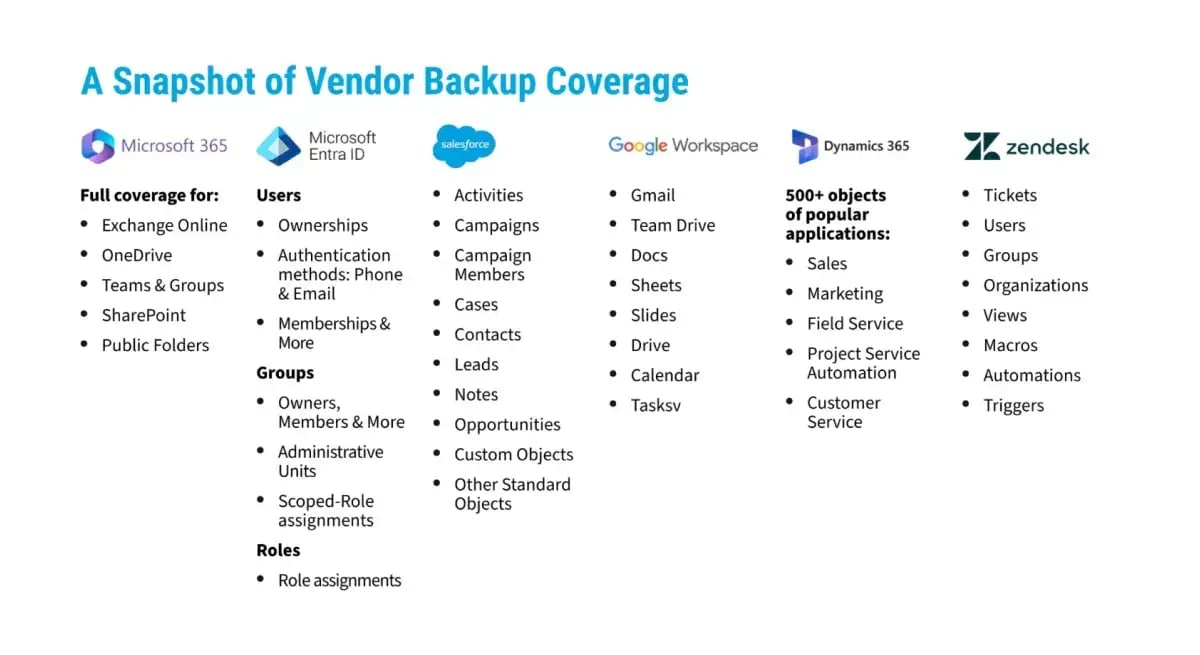
Arcserve SaaS Backup is a comprehensive cloud-native, cloud-to-cloud backup solution designed to protect your data hosted in SaaS application clouds such as Microsoft Office 365, Entra ID, Microsoft Dynamics 365, Salesforce, Google Workspace, Zendesk, Jira Cloud, and other SaaS platforms.
| A single pane of glass for SaaS-based backups: enjoy super-fast navigation while retaining complete control over the protected data with multi-tenant and Role-Based Access Controls (RBAC). | Top-notch security and compliance: Arcserve SaaS Backup and its global data centers maintain ISO/IEC 27001:2013 and ISAE 3402-II certifications, as well as compliance with major regulations, like HIPAA. |
Cost-effectiveness: take advantage of a single price per seat that includes comprehensive SaaS data protection functionalities. |
Security, scalability, and availability by design: data in transit and data at rest is encrypted with a default 30-day delete retention. Four copies of the backup data in 2 different datacenters within the same region guarantee data sovereignty and redundancy. |
Start Protecting Microsoft 365 Data Today
Your Microsoft 365 data powers critical business operations. Protecting it with enterprise-grade backup solutions is essential for survival in today's threat landscape. Take action today before the next data loss incident tests your organization's resilience and recovery capabilities.
Ready to safeguard your critical business data with a proven partner? Contact Arcserve today to discuss your organization’s needs and to see a demo.
1. Help Net Security, Ransomware attackers hop from on-premises systems to cloud to compromise Microsoft 365 accounts, September 2024